Development Guidelines
Architecture
The overview of the pipeline is shown below:
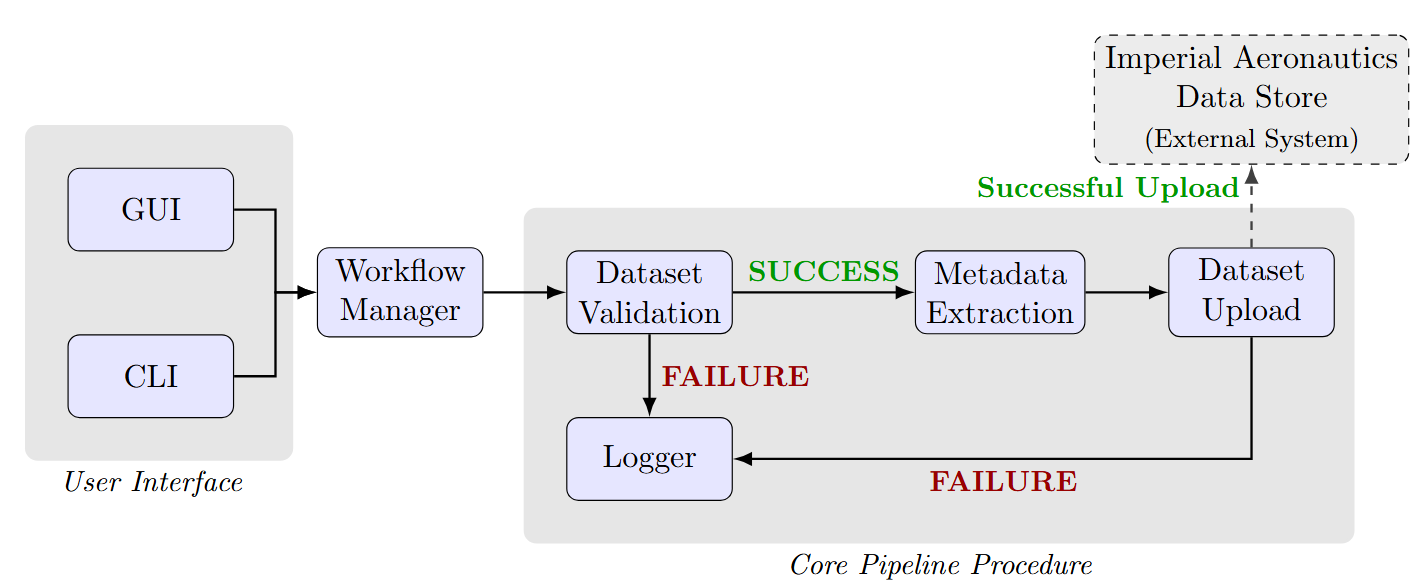
This is reflected in the software architecture, with pipeline developed separately to the interfaces. The workflow manager is responsible for providing suitable abstractions for the interfaces to call. This provides a separation of concerns to make the software easier to develop and maintain.
The code repository is structured in a way to reflect the various responsibilities of the pipeline and does so in a way that isolates each functionality. The main sub-packages in the repository are:
NekUpload/NekData: Responsible for defining behaviour of elementary components of Nektar++
NekUpload/metadata: Responsible for managing metadata for AE Datastore and automatically extracting metadata from files
NekUpload/upload: Responsible for uploading files to AE Datastore
NekUpload/utils: Set of common utility functions such as file parsing
NekUpload/validate: Responsible for validation logic
NekUpload/frontend: Contains GUI logic
There are also a set of other modules in the NekUpload directory:
NekUpload/cli.py: Entry point for the CLI
NekUpload/index.py: Entry point for the GUI, calls components from NekUpload/frontend
NekUpload/manager.py: Workload manager in the diagram above
NekUpload/testutils.py: Set of testing utilities
The idea behind this structure is each component can be developed separately. The workload manager can be built up from the sub-packages and used in the GUI, CLI and other interfaces.
Code Guidelines
NekUpload/NekData
This package is responsible for defining elementary components of Nektar++. It provides enums for describing various types, such as BasisType and SolverType. It also provides objects such as Expansions and Composites to store and represent expansion and composite definitions defined in the datasets. Any abstraction of elementary Nektar++ data types should go here.
NekUpload/frontend
This contains the logic for all GUI interactions. The current GUI utilises tkinter and ttkbootstrap for styling purposes. The latter introduces new features and clean, modern styling to the basic tkinter without introducing extra dependencies. The GUI is developed in a manner similar to modern React projects, with scenes loaded into the application. NekUpload/frontend contains assets (e.g. static images), components (small reusable widgets) and scenes (pages of the GUI). A config directory provides easy change of settings.
Currently there are six pages at varying levels of maturity. These are:
Info: Landing page with intorudction to NekUpload
Upload: Upload form for submitting files to the upload and validation pipeline
Review: Review and adjust submitted datasets (Not yet implemented)
Explore: See what datasets are already submitted, both drafts and published
Help: FAQ page for extra help with the pipeline
Settings: Configure the GUI. API key must be provided here.
tkinter uses widgets to generate the GUI. The modern grid method is used to place widgets within the GUI. See TKDocs for more information on how to use the GUI. Generally speaking, if you are implementing a new widget and it is becoming rather complex, then it should be made into either a function or widget sub-class. This encapsulates the behaviour allowing for easier management of states.
Some general considerations:
The code is messy in some places, which will require some tidying up
Label widgets do not automatically wrap when windows change. Labels must have an event added that allows them to auto-wrap according to the windows:
def update_wraplength(self, event):
# Dynamically set the wraplength based on the width of the parent frame
# Subtract a little for padding and margin
self.question_1.config(wraplength=event.width - 20)
Warning
Currently, this must be manually edited for each page. An issue has been submitted to rectify this.
When entries are empty, it turns red.
Warning
Lots of bugs withi this one, issue has been submitted.
NekUpload/validate
This contains all the validation logic required for the validation pipeline. session.py, geometry.py and output.py contain validation logic for each Nektar++ file. For consistency checks involving multiple files, a sensible choice must be made to dictate which file to place it in. Validation checks should fail fast and raise a suitable exception. Only ExperimentalException won’t cause pipeline failure, as workload manager will catch this and emit a warning before continuing. This exception should only be used for edge cases that are not 100% rigorous. Some functions may return a boolean and/or a string providing a comment to the upload pipeline.
Note
The structure of validation checks should be unified a bit more. An issue has been submitted.
A dynamic HDF5 schema can be crafted using the classes in hdf5_definitions.py. It encapsulates what a particular group or dataset should look like and checks for its presence in a specified file. It is then possible programatically to read parts of a HDF5 file, generate what extra groups and datasets should look like, then impose those restrictions on the rest of the file.
NekUpload/upload
The philosophy for designing this package is very simple. invenio_rdm_api.py provides an API abstraction layer. Every function corresponds to one API endpoint and it always returns raw requests.Response objects.
invenio_db.py is a response handling layer, focusing on processing the request response and provides callers with an easy way of executing API calls without having to know the nature of the calls. The class InvenioRDM encapsulates the upload procedure, providing a simple upload interface for clients to call.
Note
As AE Datastore develops, it will inevitably diverge from InvenioRDM. The InvenioRDM class should evolve to satisfy the needs of AE Datastore. If it is desirable to maintain compatibility with both databases, then AE Datastore logic must be handled by a subclass of the InvenioRDM class.
NekUpload/metadata
This module is responsible for modelling InvenioRDM/AE Datastore metadata and extracting relevant metadata from the datasets. The core object InvenioMetadata is responsible for storing metadata fields supported by InvenioRDM and AE Datastore, and is also responsible for generating the correct metadata payload for upload. To support enforcement of valid metadata fields, other objects, such as Identifier and Relations are specified to provide users with ways to correctly specify metadata fields. All metadata fields should be modelled here, including the CFD-specific metadata.
Meanwhile, extractor.py contains extraction logic. It currently provides an object NekAutoExtractor that can be called to acquire all relevant metadata. The results are returned as a dictionary. Any extraction of results for the purpose of metadata annotations goes here.
Note
There is lots of parsing required. Parsing is primarily the responsibility of NekUpload/utils. This package simply uses parsing functions from that package.
NekUpload/utils
This section contains general utilities common to all packages. Most notably, it has a couple of modules for parsing information. It contains hdf5_reader.py and xml_reader.py and parsing.py which provide parsing logic. Note that there is some overlap between them which could be consolidated. Other useful files in here include notifications.py, which provides some logging utilities, and gitlab_api.py, which contains Python wrappers of relevant GitLab API requests.
Note
Another parsing module file.py, currently in the validate package, also contains abstractions of Nektar++ files for extraction purposes. An issue has already been submitted to move this to the utils package.
Integrating the Components: manager.py
This is the workload manager. It is the central piece linking the interface to the pipeline. This calls the correct sequence of tasks from the validation and uploading logic and exposes a simple API for clients to call. The interfaces (GUI and CLI) should only call the workload manager when communicating with the pipeline. Data types from the metadata package can also be used by interfaces to handle correct storage and formatting of metadata.
Note
Some aspects of the packages metadata and upload are exposed to the client. Whether that is necessary or not remains under evaluation and if necessary a breaking workload manager update to the API may be required.
Integrating the Components: index.py
This is the entry point to the GUI. The menu bar, message box, and title are static. Selecting different items in the menu will load that page in. Currently, all pages are held in memory somewhere, which may bloat the memory slightly. However, for the few pages we have, it works fine and makes state management extremely simple. The only real difficulty in state management is passing details from the settings page to the rest of the GUI. This is currently handled by a settings manager, which could be improved (although it does its job). Therefore, each new page to be loaded in, also known as a scene, must be able to take settings manager as an input to configure the page correctly.
Integrating the Components: cli.py
The CLI provides a utility tool the dump-to-plain-file command to create a plain readable file from a HDF5 file. The main role of the CLI is to provide users with a way to access the pipeline and a rough drafted CLI currently uses a set of complex sub-commands that quickly become difficult to manage. A better may be to use a configuration file format, which is also supported but lacks maturity. The CLI needs a complete revamp and can be freely adjusted provided the utility tools remain.